Welcome to our newsletter, posit::glimpse()!
If you’re currently reading this on our blog, consider subscribing to Product Updates - Open Source on our subscription page to receive this newsletter directly in your inbox.
Every month, we round up some of the most important open-source news for Posit’s community! We hope that you enjoy this newsletter and maybe even share it with a friend.
The table of contents on the right can help you navigate through all the updates. As you scroll, it will open up to show you subcategories →
Announcements#
Register for posit::conf(2026)#
Register for our annual conference, posit::conf(2026), happening September 14-16 in Houston and online! The amazing speakers and workshops will make for a wonderful time. Register for posit::conf here.
For the first time, the live streams will feature automatically translated subtitles, available in French, German, Italian, Portuguese, and Spanish.
Tidy Dev Day is on September 17, a unique opportunity to collaboratively tackle open-source issues and work directly alongside the very developers who build and maintain the tools you use every day. Learn more about Tidy Dev Day here.
Migrating to Connect Cloud#
A thank-you to everyone who published on rpubs.com, quartopub.com, shinyapps.io, and bookdown.org. We’re consolidating all our publishing tools into one: Posit Connect Cloud. Connect Cloud is built to handle all of the content types in one place, with one account, and we hope to make your transition as smooth as possible.
Key product updates and new releases#
httr2 1.3.0#
httr2 is a comprehensive HTTP client for R for working with web APIs. httr2 1.3.0 introduces a breaking change to OAuth token caching that requires one-time re-authentication. Recent patches added 200x faster streaming for short-line responses, OAuth server metadata discovery, OpenTelemetry tracing support, and httr2_translate() for converting requests to curl commands.
ir 0.1.0#
Introducing ir 0.1.0, a command-line tool for running self-describing R scripts and Quarto documents with embedded package dependencies and R version requirements, inspired by Python’s PEP 723 and uv run --script. The tool supports isolated environments, CRAN snapshot dates, mixed R/Python workflows, and caches resolved dependencies for efficiency, enabling one-file workflows without full project structures.
lorax#
lorax introduces a unified interface for characterizing tree- and rule-based models across 12 implementations including ranger, XGBoost, LightGBM, and random forests. The package enables extracting decision rules, identifying active predictors, converting trees to partykit format for visualization, and accessing variable importance scores through consistent APIs that work across diverse tree model packages.
mcptools, an R SDK for the Model Context Protocol, is now on CRAN. It brings image support for rich content in both directions, native authenticated remote server connections eliminating the npm dependency, and streamlined Posit Connect deployment via _server.yml. This R SDK for the Model Context Protocol enables deploying R functions as MCP servers and fetching third-party MCP tools as R functions.
Quarto 1.10#
Quarto transforms Markdown, code, and computational output into publication-ready articles, reports, presentations, websites, and books. Version 1.10 introduces offline HTML accessibility checking with bundled axe-core and WCAG conformance level targeting, plus localized string support for template authors. The release includes important fixes for quarto preview reliability, shortcode resolution in math expressions, and updated dependencies including pandoc 3.10 and typst 0.15.1.
raghilda v0.2#
Raghilda is a Python package for building RAG (Retrieval-Augmented Generation) solutions. This release focuses on production-ready features for scaling RAG pipelines, with crawl and ingest API with caching and concurrency, a CloudflareCrawler for JavaScript-rendered sites, a PostgreSQL store backend, and NVIDIA NIM embeddings.
roxygen2 8.1.0#
roxygen2 8.1.0 improves performance with consolidated importFrom() directives that reduce package loading time from ~120ms to ~9ms for 1,000 imports, and introduces the rdtools package for faster cross-reference resolution during documentation generation. The release also adds multi-line support for @importFrom directives with hanging indents.
Shiny updates#
Shiny is the framework for building interactive web applications in R and Python. Shiny for R 1.14 adds startApp() for non-blocking app launches and session$destroy() for proper module cleanup. Shiny for Python 1.7 includes bundled Agent Skills for coding agents and test mode with live JSON snapshots. bslib 0.12 introduces offcanvas panels that slide in from viewport edges, plus direct sidebar handle resizing.
Positron learning resources#
The Positron team is on a roll. Here are the key features from the July Release Highlights:
- The Positron Notebook Editor now serves as the default option for .ipynb files: You get a fully integrated experience for Jupyter Notebooks out of the box. Key tools like environment management, version control, and AI coding support work automatically the moment you open any .ipynb file.
- The Packages pane has officially transitioned out of preview status: Inspect, update, and explore installed libraries without leaving your IDE or relying on Terminal commands.
- Posit Assistant has reached general availability: AI assistance is enterprise-ready: enjoy full-fledged coding assistance, debugging help, and inline explanations directly in your workflow with improved stability and performance.
- Support for opening Excel workbooks has been added to Data Explorer: No need to export to CSV or switch to Microsoft Excel to check your data: preview, filter, inspect .xlsx sheets directly inside Positron before running any code.
- Enhanced language intelligence for R: Navigating large R projects is much faster and less error-prone with features like Go to Definition, Find References, and Rename Symbol that work across all packages and scripts in your workspace. Diagnostics update instantly even when files change externally.
The team has also shared several blog posts packed with tips and tricks for getting the most out of Positron:
Let’s learn about AI#
You can now receive the AI newsletter via email! Paste the newsletter’s RSS feed URL into a free RSS-to-email service like https://blogtrottr.com/ to receive the newsletter by email.
Do you want event recordings? You got them!#
“Will this be recorded?” If it is, you can access our recordings directly on the event pages, and we do our best to post them as quickly as possible.
Be sure to catch the presentations featured below, including Teun van den Brand’s session on ggsql and Rich Iannone’s presentation on Great Docs:
Jul 6, 2026
|
1h 5min
|
174 views
Great Docs: The Future of Documentation | The Python Exchange June 2026
About the Python Exchange for the Department of Energy: https://meetup.doepy.org/ Sign up here to be notified when the next Python Exchange is scheduled: https://bit.ly/py-exchange
Guest Panelist: Rich Iannone
Title: Great Docs: Building the Documentation Site Generator I Always Wanted
Bio: Rich Iannone Rich is a software engineer and someone who cares a great deal about documentation and summary tables. He’s been working on table presentation and documentation packages for quite a long time, and nobody has told him to stop yet, so he’s still on top of all that. He started off mostly creating open-source packages in R, but more lately, he’s been doing open-source things in Python. Rich really enjoys creating all these packages because he realizes that people can use ’em to do great things in their own work.
Abstract: Documentation generators have, for me, been a thing where there are so many trade-offs. They might make beautiful sites, but be shallow feature-wise. Or full of features but really hard to configure. After some years of working across R, Python, and the broader open-source ecosystem, I started Great Docs with a simple end goal: your docs should look really great, be easy to discover, and be ready for the AI era.
In this presentation, I will walk through the various places I drew inspiration for Great Docs (pkgdown, MATLAB, Elixir, and the Vue.js docs). I’ll show how Great Docs makes documentation consumable by both humans and AI agents through Skills and MCP server documentation. I’ll share some of the features I obsessively built because I wanted them in my own package docs. Finally, I’ll discuss where this project is headed beyond Python (toward documenting CLIs, TUIs, and more).
At Don’t Use This Code, we want to create a unique opportunity to see Python succeed and thrive within the DOE. In collaboration with an organizing committee of Python users and advocates from various DOE sites, we host regular conversations on the topic of Python in order to create a new resource for scientists, researchers, and technical staff. Our goal is to share best practices and build a strong, lasting community for Python users within the Department of Energy National Lab system.
If you, or someone you know, might make a great panelist, we’d love to get in touch! Just send us an email at DOEPy@dutc.io if you would like to participate or have any questions
Great Docs
pkgdown
Additionally, we have some fantastic recordings from the Data Science Lab. Watch the Lab Managers share their expertise while live coding:
Jul 24, 2026
|
51 min
|
1.1k views
Live TidyTuesday Data Viz Workflow | Nicola Rennie | Data Science Lab
The Data Science Lab is a live weekly call. Register at pos.it/dslab! Discord invites go out each week on lives calls. We’d love to have you!
The Lab is an open, messy space for learning and asking questions. Think of it like pair coding with a friend or two. Learn something new, and share what you know to help others grow.
On this call, Libby Heeren is joined by Nicola Rennie, who walks through her process for making a TidyTuesday data visualization in R: live coding a chart from scratch and sharing the workflow tricks she’s built up over five years of doing TidyTuesday!
Nicola takes this week’s TidyTuesday “twin cities” dataset and builds a colorful sunburst (radial) chart from scratch, showing how she decides what to plot, wrangles the data with dplyr, and makes it pretty using showtext fonts, rcartocolor palettes, colored-text legends, and the ggview package for previewing plots at exactly the size they’ll save at. Along the way she shares the templates and helper packages she’s made to save time every week (can you tell she’s a pro?!). Since TidyTuesday data is public, you can grab the same dataset and follow along, too!
Hosting crew from Posit: Libby Heeren, Isabella Velasquez
Socials and websites: Nicola Rennie’s blog: https://nrennie.rbind.io/ Nicola Rennie’s GitHub: https://github.com/nrennie Nicola Rennie’s Bluesky: https://bsky.app/profile/nrennie.bsky.social Nicola Rennie’s LinkedIn: https://www.linkedin.com/in/nicola-rennie/ Nicola Rennie’s Mastodon: https://fosstodon.org/deck/@nrennie
Resources mentioned in the video and chat: Nicola’s code from this session: https://nrennie.rbind.io/talks/posit-ds-lab/ TidyTuesday on GitHub: https://github.com/rfordatascience/tidytuesday Nicola’s templates package: https://github.com/nrennie/templates showtext package (fonts in R): https://github.com/yixuan/showtext ggview package (preview plots at save size): https://github.com/idmn/ggview rcartocolor package (accessible color palettes): https://nowosad.r-universe.dev/rcartocolor ggtext package (styled/colored text): https://wilkelab.org/ggtext/ ggiraph package (interactive ggplots): https://davidgohel.github.io/ggiraph/ marquee package (markdown text in R graphics): https://marquee.r-lib.org/ Nicola’s book, The Art of Data Visualization with ggplot2: https://nrennie.rbind.io/art-of-viz/ Bootstrap Icons: https://icons.getbootstrap.com/ okpalette (extract a palette from a photo): https://okpalette.color.pizza/
► Subscribe to Our Channel Here: https://bit.ly/2TzgcOu Follow Us Here: Website: https://www.posit.co Hangout: https://pos.it/dsh The Lab: https://pos.it/dslab LinkedIn: https://www.linkedin.com/company/posit-software Bluesky: https://bsky.app/profile/posit.co
Thanks for hanging out with us!
Timestamps 00:00 Introduction 01:18 Reviewing the TidyTuesday twin cities dataset 03:41 Demoing TidyTuesday template files and R package setup 07:25 “Do showtext and systemfonts do different things?” 09:04 Loading and prepping the links and cities datasets 11:45 Exploring and filtering the dataset to a chosen city 17:25 Demoing a Shiny app to copy previous TidyTuesday chart code 23:56 Demoing sunburst chart creation with coord_radial 25:47 “Can you say why you used mutate rather than summarize?” 31:09 Adding custom colors with the rcartocolor package 33:57 Demoing colored subtitle text with the ggtext package 40:38 Attempting to make the chart interactive with the ggiraph package 43:32 Adding automated social and source captions 46:26 “So you can save a plot with the canvas call and it doesn’t mess up the ggplot object?” 49:55 “If people would like to keep up with you and see your posts, what’s the best way to do that?”
dplyr
ggplot2
Shiny
systemfonts
Jul 23, 2026
|
56 min
|
3.8k views
Mind-Blowing Quarto Slide Extensions 💬 🖍️ 🤯 | Emil Hvitfeldt | Data Science Lab
The Data Science Lab is a live weekly call. Register at pos.it/dslab! Discord invites go out each week on lives calls. We’d love to have you!
The Lab is an open, messy space for learning and asking questions. Think of it like pair coding with a friend or two. Learn something new, and share what you know to help others grow.
On this call, Libby Heeren is joined by Emil Hvitfeldt, who walks through the art of “slide crafting” in Quarto and shows off the collection of Reveal JS extensions he’s been building to make slides way more fun and powerful.
Emil starts with the basics of building slides in Quarto with the Reveal JS format (fragments, columns, a little CSS) and explains how Quarto extensions differ from packages. Then he shows off the good stuff: iMessage-style chat bubbles hand-drawn “rough notation” highlighting and annotations ️ the Flourish extension for animating code chunks, gorgeous reusable themes, and his in-progress “editable” extension that lets you drag, resize, and restyle slide elements right in the browser and save the changes back to your source. And, spoiler, his “editable” extension is much further along as of the publishing of this video!! If you’ve ever fought with slide layouts, there is definitely something here you can try at home!
Hosting crew from Posit: Libby Heeren, Isabella Velasquez
Emil’s socials and urls: website: https://emilhvitfeldt.com/ GitHub: https://github.com/emilhvitfeldt Bluesky: https://bsky.app/profile/emilhvitfeldt.bsky.social LinkedIn: https://www.linkedin.com/in/emilhvitfeldt/
Resources mentioned in the video and chat: Emil’s GitHub (home of his Quarto extensions): https://github.com/EmilHvitfeldt quarto-revealjs-editable extension: https://github.com/EmilHvitfeldt/quarto-revealjs-editable quarto-revealjs-rows extension (shared by Emil after the session): https://github.com/EmilHvitfeldt/quarto-revealjs-rows Quarto Reveal JS documentation: https://quarto.org/docs/presentations/revealjs/ Quarto Reveal JS demo slides: https://quarto.org/docs/presentations/revealjs/demo/#/title-slide News! Quarto 2 (Quarto in Rust): https://quarto.org/docs/blog/posts/2026-04-06-whats-next-quarto-2/ Dynamic Tabsets in Quarto (Josh Cowley): https://josh.quarto.pub/posts/2022-11-10-quarto-tabsets-update/2022-11-10-quarto-tabsets-update.html Embedding Reveal JS via iframe (Quarto source example): https://github.com/quarto-dev/quarto-web/blob/main/docs/presentations/revealjs/index.qmd#L12-L14 posit::conf 2026: https://conf.posit.co/2026/ R/Medicine conference: https://rconsortium.github.io/RMedicine_website/ Muntasir Masum’s slides repo: https://github.com/muntasirmasum/epi553-data-viz Example Quarto slides — Nicola Rennie (Styling Charts): https://nrennie.rbind.io/MFC-CDT-data-viz/slides/styling-charts-r.html Example Quarto slides — Colin Madland: https://cmadland.github.io/slides/ Colin Madland’s slides repo: https://github.com/cmadland/slides Example Quarto slides — Raha Dastgheyb (R/Medicine 2024): https://rdastgh1.quarto.pub/rmedicine-2024-scidatareportr/#/title-slide
► Subscribe to Our Channel Here: https://bit.ly/2TzgcOu Follow Us Here: Website: https://www.posit.co Hangout: https://pos.it/dsh The Lab: https://pos.it/dslab LinkedIn: https://www.linkedin.com/company/posit-software Bluesky: https://bsky.app/profile/posit.co
Thanks for hanging out with us!
Timestamps 00:00 Introduction 01:22 Demoing a primer on Reveal JS slides in Quarto 05:11 “Does that PDF export still use Pandoc, or is there an option of exporting via Typst?” 08:17 Demoing slide crafting with a new Quarto document 11:24 Demoing how to download and use a Quarto template 14:01 “Is this UI you’re using for slide generation exclusive to Positron?” 16:16 Demoing how to install a Quarto extension from the terminal 18:45 “Is there a maximum number of columns you can have?” 19:18 Demoing adding custom CSS classes to slide columns 23:03 “Do we know if extensions will still be submitted to the OpenVSX marketplace?” 25:11 “Are these Quarto extensions global, or are they per project?” 27:42 “When you change the text fonts inside those columns, could you do it for all the columns at once, maybe by changing the top div?” 29:31 “Do you also get grid logic like you have with CSS Grid?” 31:54 Demoing Quarto VS Code extensions for autocomplete and shortcodes 34:32 Demoing the chat bubbles extension 37:38 Demoing the rough notation extension for highlighting text fragments 40:20 Demoing the Flourish extension for highlighting code chunks 43:07 Demoing the editable extension for dragging and adjusting slide elements 49:28 Demoing custom Reveal JS slide themes 52:26 “Is there a Quarto extension that can help dynamically create tabs or chunks?” (see dynamic tabs link in the resources above!) 53:58 Explaining the default code chunk highlighting feature in Quarto 55:11 “How do you embed a Reveal JS site into another Quarto document?”
Positron
Quarto
revealjs
We hope you learn a lot from these resources!
We love learning what you are up to. If you have a project using our tools to share, please let us know. In particular, I’d love to hear how you’re adopting and using Positron! Find me on LinkedIn and Bluesky.
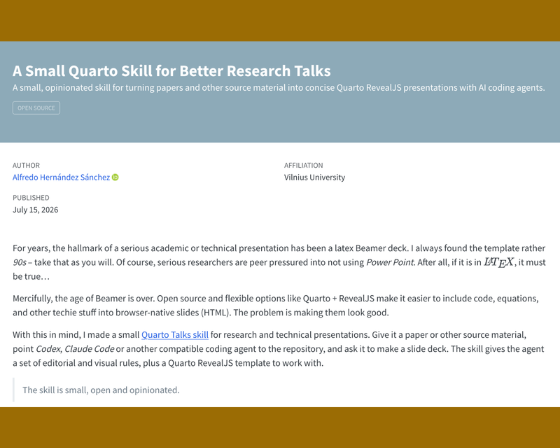
Alfredo H. S. shared a small, opinionated skill for turning papers and other source material into concise Quarto RevealJS presentations with AI coding agents.
Try it out, and let Alfredo know how it goes!
REYL Intesa Sanpaolo’s Risk Management team built their own Incident Management Tool with Shiny and Posit Connect, cutting incident follow-up from days to 30 minutes. Now, they’re eyeing the same R-and-Connect pattern for liquidity monitoring, credit risk appetite, and stress testing.
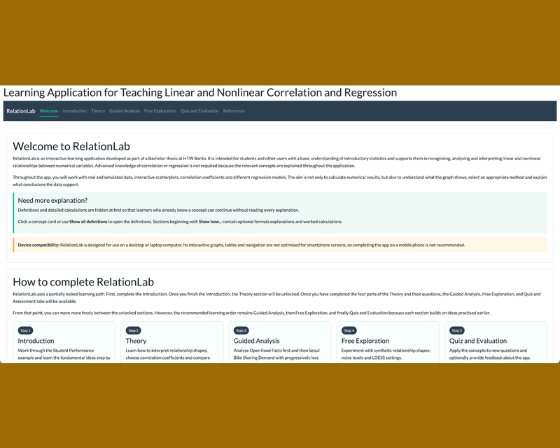
Interested in testing your regression skills? Angela Heberger is looking for feedback on RelationLab, an interactive Shiny app for learning correlation and regression. Give it a shot and let Angela know what you think!
We usually find these projects on social media. If you’re on LinkedIn, be sure to follow and tag Posit Open Source for us to share the amazing things you’re working on!
What’s next#
Besides posit::conf (have you registered for conf yet? You should!), we have lots of goodies on the horizon.
I would love to know how to make the Glimpse newsletter better. Email me at isabella [dot] velasquez [at] posit.co.