



The first major release of mcptools, an R SDK for the Model Context Protocol, is now on CRAN! This release includes several notable features: fetching tools from remote authenticated servers, deploying MCP servers on Posit Connect, and support for images and other rich content types.
To install the package, run:
install.packages("mcptools")To demo these new features, I’ll deploy an R function that returns a picture to an MCP server on Posit Connect. Then, in another R session, I’ll connect to that server and ask an ellmer chat to take a look at the picture and tell me what it sees.
library(mcptools)Images in tool results#
mcptools supports “both directions” of MCP. In one direction, users can deploy R functions as MCP servers. In the other direction, users can fetch tools from third-party MCP servers as R functions. mcptools now supports both serving and fetching tools that return images.
As an example of a function that returns an image, let’s consider a tool fetch_reference_image():
library(ellmer)

tools <- list(
  fetch_reference_image = tool(
    function() {
      content_image_url(
        "https://simonpcouch.com/blog/2026-04-16-local-agents-2/featured.png"
      )
    },
    name = "fetch_reference_image",
    description = "Fetch the reference image."
  )
)
Running that function:
tools$fetch_reference_image()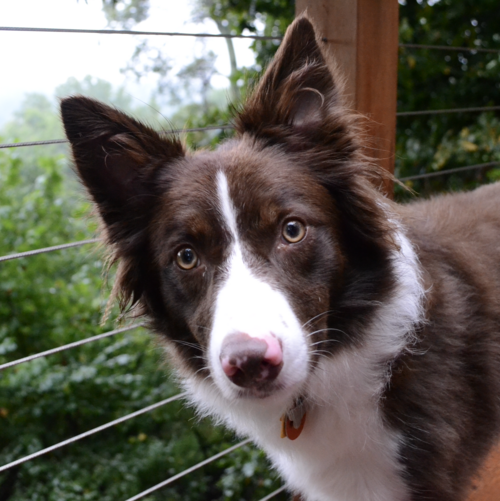
Without MCP, I can ask a model to look at the image and tell me what it sees:
ch <- chat_claude("Be brief.")
ch$register_tool(tools[[1]])
ch$chat("What do you see in the reference image?")
#> I can see a beautiful Border Collie dog in the reference
#> image. The dog has:
#>
#> - A chocolate brown and white coat with distinctive
#>   coloring
#> - Amber/brown eyes
#> - Alert, perked ears
#> - A white blaze down the center of its face
#> - A pink/brown nose
#> - Long, fluffy fur typical of the breed
#>
#> The dog appears to be outdoors, positioned near what
#> looks like a wooden post or railing with wire fencing
#> visible in the background. There's greenery and trees
#> visible in the blurred background. The dog has an
#> attentive, intelligent expression that's characteristic
#> of Border Collies.
In the next two sections, I’ll deploy this function on Posit Connect and then fetch it from a fresh R session so that future ellmer chats can fetch this same image.
MCP Servers on Posit Connect#
mcptools has now adopted plumber2’s _server.yml open standard. This means that, to deploy an MCP server on Posit Connect, you just need to add a _server.yml file in your project root that looks like this:
engine: mcptools
tools: tools.R
tools.R (or whatever you choose to name the file) is a file that defines ellmer tools and returns them in a list. In my case, tools.R looks exactly like the code chunk defining tools above. I can then run rsconnect::deployAPI(".", contentCategory = "mcp") to deploy the tools from tools.R as an authenticated MCP server on Posit Connect.
Fetch tools as R functions from authenticated MCP servers#
Perhaps the biggest gap in mcptools before this release was that mcp_tools() did not support remote, authenticated MCP servers. Up to this point, I had written in documentation that folks ought to use npx mcp-remote, which converts remote MCP servers (like Slack, Confluence, or really any of the most well-adopted third-party MCP servers) into local ones. That meant that, even though mcptools only implemented the local half of the protocol, mcptools users could connect to remotely hosted MCP servers.
This is undesirable for a few reasons. For one, mcptools should “just work” without users having to install software from sources other than CRAN. Further, installing code via npx is particularly problematic; the node package registry has been the source of a number of particularly concerning supply chain attacks recently.
mcp_tools() now natively supports fetching tools from authenticated, third-party MCP servers. For example, a configuration that used to look like:
{
  "mcpServers": {
    "connect": {
      "command": "npx",
      "args": [
        "mcp-remote",
        "<my_deployed_connect_listing>",
        "--header",
        "Authorization: Key ${CONNECT_API_KEY}"
      ]
    }
  }
}
Now looks like:
{
  "mcpServers": {
    "connect": {
      "url": "<my_deployed_connect_listing>",
      "headers": {
        "Authorization": "Key ${CONNECT_API_KEY}"
      }
    }
  }
}
I’ll save that latter configuration as config.json. Then, I’ll provide it to mcp_tools():
tools_fetched <- mcp_tools(config = "config.json")

class(tools_fetched[[1]])
#> [1] "ellmer::ToolDef" "function"        "S7_object"
Now I can register the fetched tools with a chat in a new R session, and it has access to the same image:
ch_new <- chat_claude()
ch_new$register_tools(tools_fetched)
ch_new$chat("What's in the reference image?")
#> The reference image features a **Border Collie** dog.
#> Here are some details:
#>
#> - **Coloring**: The dog has a striking **brown
#>   (chocolate) and white** coat, with a distinctive white
#>   stripe running down the center of its face.
#> - **Expression**: It has an alert and attentive look,
#>   with beautiful **amber/brown eyes**.
#> - **Tongue**: Its tongue is slightly visible, giving it a
#>   cute appearance.
#> - **Setting**: The dog appears to be on a **deck or
#>   porch**, with cable/wire railings visible, and a lush
#>   green, leafy background suggesting an outdoor, wooded
#>   area.
#> - **Accessories**: It appears to be wearing a small
#>   **collar tag**.
#>
#> Overall, it's a beautiful and expressive dog photo! 🐕
Taken together, the changes in this release should allow R users to do much more with MCP! For a more complete list of changes in this release, see the package changelog.