

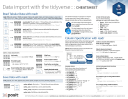
Importing data with the tidyverse
Learn about readr, readxl, and haven


One of the first steps of a project is to import outside data into R. Data is often stored in tabular formats, like csv files or spreadsheets.
- The first half of this cheatsheet shows how to import and save text files into R using readr.
- The second half shows how to import spreadsheet data from Excel files using readxl or Google Sheets using googlesheets4.
|
|
For importing other types of data try one of the following packages:
- haven: SPSS, Stata, and SAS files
- DBI: databases
- jsonlite: json
- xml2: XML
- httr: Web APIs
- rvest: HTML (Web Scraping)
- readr::read_lines(): text data
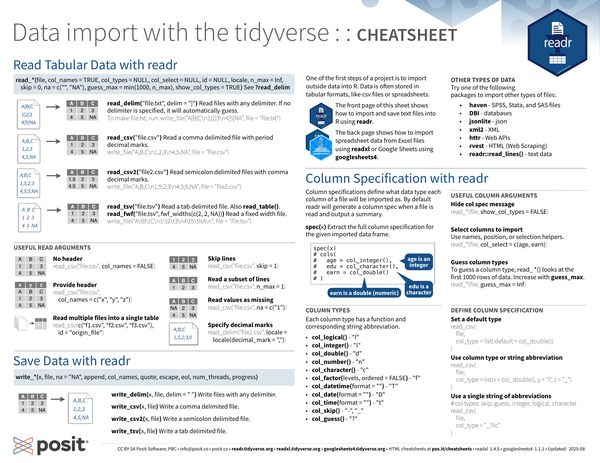
Read Tabular Data with readr#
|
|
See ?read_delim.
|
|
Examples#
-
Read files with any delimiter:
read_delim(). If no delimiter is specified, it will automatically guess.-
If the file you want to import is the following:
1 2 3A|B|C 1|2|3 4|5|NA1 2 3 4#| label: write-file-txt #| echo: false write_file("A|B|C\n1|2|3\n4|5|NA", file = "file.txt") -
Read it with
read_delim()and it will look like the following when imported:1 2read_delim("file.txt", delim = "|", show_col_types = FALSE) -
To make
file.txt, run:1 2#| ref.label: write-file-txt #| eval: false
-
-
Read a comma delimited file with period decimal marks:
read_csv().-
If the file you want to import is the following:
1 2 3A,B,C 1,2,3 4,5,NA1 2 3 4#| label: write-file-csv #| echo: false write_file("A,B,C\n1,2,3\n4,5,NA", file = "file.csv") -
Read it with
read_csv()and it will look like the following when imported:1read_csv("file.csv", show_col_types = FALSE) -
To make
file.csv, run:1 2#| ref.label: write-file-csv #| eval: false
-
-
Read semicolon delimited files with comma decimal marks:
read_csv2().-
If the file you want to import is the following:
1 2 3A;B;C 1,5;2;3 4,5;5;NA1 2 3 4#| label: write-file-csv2 #| echo: false write_file("A;B;C\n1,5;2;3\n4,5;5;NA", file = "file2.csv") -
Read it with
read_csv2()and it will look like the following when imported:1read_csv2("file2.csv", show_col_types = FALSE) -
To make
file2.csv, run:1 2#| ref.label: write-file-csv2 #| eval: false
-
-
Read a tab delimited file:
read_tsv()orread_table().Read a fixed width file:
read_fwf("file.tsv", fwf_widths(c(2, 2, NA))).-
If the file you want to import is the following:
1 2 3A B C 1 2 3 4 5 NA1 2 3 4#| label: write-file-tsv #| echo: false write_file("A\tB\tC\n1\t2\t3\n4\t5\tNA\n", file = "file.tsv") -
Read it with
read_tsv()and it will look like the following when imported:1read_tsv("file.tsv", show_col_types = FALSE) -
To make
tsv, run:1 2#| ref.label: write-file-tsv #| eval: false
-
Useful read arguments#
Suppose you have the following CSV files that you want to read in, called file.csv:
file.csv
|
|
file3.csv
|
|
To make these files, run:
|
|
-
No header:
col_names = FALSE1 2 3#| message: false read_csv("file.csv", col_names = FALSE) -
Provide header:
col_names = c("x", "y", "z")1 2 3#| message: false read_csv("file.csv", col_names = c("x", "y", "z")) -
Skip lines:
1 2 3#| message: false read_csv("file.csv", skip = 1) -
Read a subset of lines:
1 2 3#| message: false read_csv("file.csv", n_max = 1) -
Read values as missing:
1 2 3#| message: false read_csv("file.csv", na = c("1")) -
Specify decimal marks:
1 2 3#| message: false read_delim("file2.csv", locale = locale(decimal_mark = ",")) -
Read multiple files into a single table:
1 2 3#| message: false read_csv(c("file.csv", "file3.csv"), id = "origin_file")
Save data with readr#
|
|
- Write files with any delimiter:
write_delim(x, file, delim = " ") - Write a comma delimited file:
write_csv(x, file) - Write a semicolon delimited file:
write_csv2(x, file) - Write a tab delimited file:
write_tsv(x, file)
Column specification with readr#
Column specifications define what data type each column of a file will be imported as. By default readr will generate a column spec when a file is read and output a summary.
spec(df): Extract the full column specification for the given imported data frame.
|
|
Column types#
Each column type has a function and corresponding string abbreviation.
col_logical() - "l"col_integer() - "i"col_double() - "d"col_number() - "n"col_character() - "c"col_factor(levels, ordered = FALSE) - "f"col_datetime(format = "") - "T"col_date(format = "") - "D"col_time(format = "") - "t"col_skip() - "-", "_"col_guess() - "?"
Useful column arguments#
-
Hide col spec message:
1read_*(file, show_col_types = FALSE) -
Select columns to import: Use names, position, or selection helpers.
1read_*(file, col_select = c(age, earn)) -
Guess column types: To guess a column type,
read_ *()looks at the first 1000 rows of data. Increase withguess_max.1read_*(file, guess_max = Inf)
Define column specification#
-
Set a default type:
1 2 3 4 5 6#| eval: false read_csv( file, col_type = list(.default = col_double()) ) -
Use column type or string abbreviation:
1 2 3 4 5 6#| eval: false read_csv( file, col_type = list(x = col_double(), y = "l", z = "_") ) -
Use a single string of abbreviations:
1 2 3 4 5 6 7#| eval: false # col types: skip, guess, integer, logical, character read_csv( file, col_type = "_?ilc" )
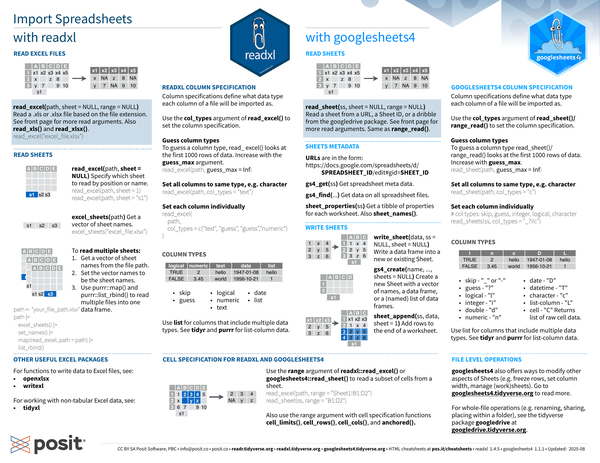
Import spreadsheets with readxl#
Read Excel files#
Read a .xls or .xlsx file based on the file extension, e.g. read_excel("excel_file.xlsx").
See [Useful read arguments] for more read arguments.
Also read_xls() and read_xlsx().
|
|
-
If the Google sheet you want to import is the following:
A B C D E x1 x2 x3 x4 x5 x z 8 y 7 9 10 : Spreadsheet with 5 columns (A through E) and three rows. First row reads x1 through x5. Second and third row have some missing values.
-
It will look like the following when imported:
1 2 3 4#| echo: false write_file("x1,x2,x3,x4,x5\nx, ,z,8, \ny,7, ,9,10", file = "excel.csv") read_csv("excel.csv", show_col_types = FALSE)
Read sheets#
-
Specify which sheet to read by position or name:
read_excel(path, sheet = NULL)read_excel(path, sheet = 1)read_excel(path, sheet = "s1")
-
Get a vector of sheet names:
excel_sheets(path)excel_sheets("excel_file.xlsx") -
To read multiple sheets:
-
Get a vector of sheet names from the file path.
-
Set the vector names to be the sheet names.
-
Use
purrr::map()andpurrr::list_rbind()to read multiple files into one data frame.1 2 3 4 5 6 7 8#| eval: false path <- "your_file_path.xlsx" path |> excel_sheets() |> set_names() |> map(read_excel, path = path) |> list_rbind()
-
readxl column specification#
-
Column specifications define what data type each column of a file will be imported as.
-
Use the
col_typesargument ofread_excel()to set the column specification. -
Guess column types: To guess a column type,
read_excel()looks at the first 1000 rows of data. Increase with theguess_maxargument.1 2 3#| eval: false read_excel(path, guess_max = Inf) -
Set all columns to same type, e.g. character:
1 2 3#| eval: false read_excel(path, col_types = "text") -
Set each column individually:
1 2 3 4 5 6#| eval: false read_excel( path, col_types = c("text", "guess", "guess","numeric") ) -
Column types:
logical numeric text date list TRUE 2 hello 1947-01-08 hello FALSE 3.45 world 1956-10-21 1 : Table with 5 columns. Column headers are various data types (logical, numeric, text, date, and list). The data in two rows show examples of data for the given column type.
-
skip -
guess -
logical -
date -
numeric -
text -
Use
listfor columns that include multiple data types. See tidyr and purrr for list-column data.
-
Other useful Excel packages#
- For functions to write data to Excel files: openxlsx and writexl
- For working with non-tabular Excel data: tidyxl
Import spreadsheets with googlesheets4#
Read sheets#
Read a sheet from a URL, a Sheet ID, or a dribble samefrom the googledrive package. See [Useful read arguments] for more read arguments.
|
|
Same as range_read().
-
If the Google sheet you want to import is the following:
A B C D E x1 x2 x3 x4 x5 x z 8 y 7 9 10 : Spreadsheet with 5 columns (A through E) and three rows. First row reads x1 through x5. Second and third row have some missing values.
-
It will look like the following when imported:
1 2 3 4#| echo: false write_file("x1,x2,x3,x4,x5\nx, ,z,8, \ny,7, ,9,10", file = "googlesheet.csv") read_csv("googlesheet.csv", show_col_types = FALSE)
Sheet metadata#
-
URLs are in the form:
1 2https://docs.google.com/spreadsheets/d/ SPREADSHEET_ID/edit#gid=SHEET_ID -
Get spreadsheet meta data:
gs4_get(ss) -
Get data on all spreadsheet files:
gs4_find(...) -
Get a tibble of properties for each worksheet:
sheet_properties(ss). Alsosheet_names().
Write sheets#
write_sheet(data, ss = NULL, sheet = NULL): Write a data frame into a new or existing Sheet.gs4_create(name, ..., sheets = NULL): Create a new Sheet with a vector of names, a data frame, or a (named) list of data frames.sheet_append(ss, data, sheet = 1): Add rows to the end of a worksheet.
googlesheets4 column specification#
Column specifications define what data type each column of a file will be imported as.
Use the col_types argument of read_sheet()/range_read() to set the column specification.
-
Guess column types: To guess a column type
read_sheet()/range_read()looks at the first 1000 rows of data. Increase withguess_max.1 2 3#| eval: false read_sheet(path, guess_max = Inf) -
Set all columns to same type, e.g. character:
1 2 3#| eval: false read_sheet(path, col_types = "c") -
Set each column individually:
1
2
3
4
#| eval: false # col types: skip, guess, integer, logical, character read_sheets(ss, col_types = "_?ilc") -
Column types:
-
skipped my lunch 🥙 🍱 and: “_” or “-”
-
guess: “?”
-
logical: “l”
-
integer: “i”
-
double: “d”
-
numeric: “n”
-
date: “D”
-
datetime: “T”
-
character: “c”
-
list-column: “L”
-
cell: “C” (returns list of raw cell data)
-
Use list for columns that include multiple data types. See tidyr and purrr for list-column data.
-
File level operations#
- googlesheets4 also offers ways to modify other aspects of Sheets (e.g. freeze rows, set column width, manage (work)sheets). Go to googlesheets4.tidyverse.org to read more.
- For whole-file operations (e.g. renaming, sharing, placing within a folder), see the tidyverse package googledrive at googledrive.tidyverse.org .
Cell specification for readxl and googlesheets4#
Use the range argument of readxl::read_excel() or googlesheets4::read_sheet() to read a subset of cells from a sheet.
|
|
Also use the range argument with cell specification functions cell_limits(), cell_rows(), cell_cols(), and anchored().


